
News
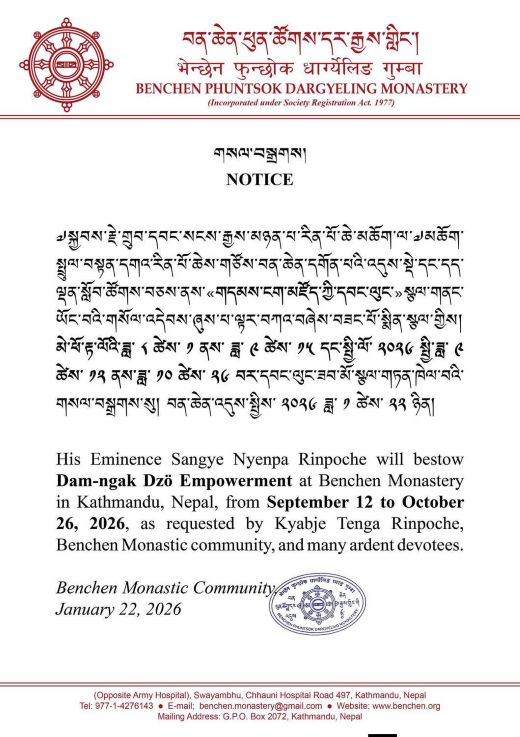
September 12 to October 26, 2026 Scheduling Announcement
>Dear Friends,
For those with time and interest, you are welcome to join Lama Gursam and Katie in attendance for the transmission of the Dam Ngak Dzod (Tibetan: གདམས་ངག་མཛོད, Wylie: gdams ngag mdzod), or "Treasury of Precious Instructions.” It is a monumental 13-volume collection of essential teachings of the eight main practice lineages of Tibetan Buddhism.
Compiled, structured, and completed by the great 19th-century master Jamgön Kongtrul Lodrö Thayé (1813–1899), it is one of his famous "Five Treasuries" and focuses on the oral instructions, key teachings, and practice manuals rather than purely philosophical or academic texts.
The transmission is being offered at Benchen Monastery in Nepal by the Tenth Sangye Nyenpa Rinpoche who was born into a family of practitioners at the temple of Paro Taktsang in Bhutan. Recognized by His Holiness the Sixteenth Karmapa and educated at Rumtek, Sikkim, Sangye Nyenpa Rinpoche is one of the Kagyu lineage's most accomplished and respected tulkus.
For general questions visit: https://www.benchen.org/en/
For personal queries:
lamagursamponsar@gmail.com
Warmly,
Lama Gursam and Katie
Social Media
Regular updates about Yogi Lama Gursam's activities and events are now on Facebook, Instagram, and YouTube! On Facebook join the group: "Yogi Acharya Lama Gursam," Follow his Instagram: "Yogilamagursam," and subscribe to his YouTube channel: "Yogilamagursam"
Also, the Bodhicitta Foundation Prayer Book can be downloaded from this site. It's laid out in booklet style in pdf format and comes in two files, the TBF prayer book (1.1 MB) and the prayer book cover (60 KB), which can be printed on heavier stock.
PRINT INSTRUCTIONS
- Click on the prayer book (or cover) link.
- Click on the printer button on your tool bar
- Pull down the Pages, Subset: window on the print range section of the Print page
- Select odd pages only
- Click Print
- Arrange printed pages so that, in the next print cycle, #2 page will print on blank side of #1 page, #4 on #3, #6 on #5, etc.
- Place arranged pages in paper tray so that blank side will print
- Click on the printer button on your tool bar
- Pull down the Pages, Subset: window
- Select even pages only.
- Click Print
Note: If you want to print multiple copies, select Page Handling
options on Print page